Pages

Showing posts with label Win32. Show all posts

Sunday, August 1, 2010

Win32: Create window menu programmatically

Standard Windows application contains a menu. Usualy we create the menu in the application resource file. Then load it and pass the menu handle whithin the window class regisration procvedure.
How to create the standard windows menu programmatically?
CreateMenu function in the following Win32 program does it:
#define WIN32_LEAN_AND_MEAN

#include <windows.h>

LPCWSTR s_szWndName = L"A window with a menu";

ATOM RegisterWndClass(HINSTANCE, LPCWSTR);
LRESULT CALLBACK WndProc(HWND, UINT, WPARAM, LPARAM);

void CreateAMenu(HWND hWnd);

int WINAPI wWinMain(HINSTANCE hInstance,
HINSTANCE, LPWSTR, int nShowCmd)
{
RegisterWndClass(hInstance, s_szWndName);

HWND hWnd = CreateWindow(s_szWndName, s_szWndName,
WS_OVERLAPPEDWINDOW | WS_CLIPSIBLINGS | WS_CLIPCHILDREN,
CW_USEDEFAULT, 0, CW_USEDEFAULT, 0,
NULL, NULL, hInstance, NULL);

if (hWnd != NULL)
{
ShowWindow(hWnd, nShowCmd);
UpdateWindow(hWnd);

MSG msg = { 0 };
while (GetMessage(&msg, NULL, 0, 0))
{
TranslateMessage(&msg);
DispatchMessage(&msg);
}
}

return 0;
}

ATOM RegisterWndClass(HINSTANCE hInstance,
LPCWSTR lpszWndClassName)
{
WNDCLASSEX wcex = { 0 };
wcex.cbSize = sizeof(WNDCLASSEX);
wcex.style = CS_HREDRAW | CS_VREDRAW;
wcex.lpfnWndProc = WndProc;
wcex.hInstance = hInstance;
wcex.hCursor = LoadCursor(NULL, IDC_ARROW);
wcex.hbrBackground = (HBRUSH)(COLOR_WINDOW + 1);
wcex.lpszMenuName = NULL;
wcex.lpszClassName = lpszWndClassName;
return RegisterClassEx(&wcex);
}

LRESULT CALLBACK WndProc(HWND hWnd, UINT message,
WPARAM wParam, LPARAM lParam)
{
switch (message)
{
case WM_CREATE:
CreateAMenu(hWnd);
break;

case WM_PAINT:
{
PAINTSTRUCT ps;
HDC hdc = BeginPaint(hWnd, &ps);
EndPaint(hWnd, &ps);
}
break;

case WM_LBUTTONDOWN:
PostMessage(hWnd, WM_CLOSE, 0, 0);
break;

case WM_DESTROY:
PostQuitMessage(0);
break;

    default:
return DefWindowProc(hWnd, message, wParam, lParam);
}
return 0;
}

#define ID_NEW_RECORD_ITEM 1001
#define ID_SAVE_RECORD_ITEM 1002
#define ID_QUIT_ITEM 1003
#define ID_SHOW_ALL_ITEM 1004
#define ID_SELECT_REPORT_ITEM 1005


void CreateAMenu(HWND hWnd)
{
HMENU hMenu = CreateMenu();
HMENU hSubMenu = CreatePopupMenu();

AppendMenu(hSubMenu, MF_STRING, ID_NEW_RECORD_ITEM, L"&New Record");
AppendMenu(hSubMenu, MF_STRING, ID_SAVE_RECORD_ITEM, L"&Save Record");
AppendMenu(hSubMenu, MF_STRING, ID_QUIT_ITEM, L"&Quit");
AppendMenu(hMenu, MF_STRING | MF_POPUP, (UINT)hSubMenu, L"&File");

hSubMenu = CreatePopupMenu();
AppendMenu(hSubMenu, MF_STRING, ID_SHOW_ALL_ITEM, L"Show &All Data");
AppendMenu(hSubMenu, MF_STRING, ID_SELECT_REPORT_ITEM, L"S&eelect report");
AppendMenu(hMenu, MF_STRING | MF_POPUP, (UINT)hSubMenu, L"&Reports");

SetMenu(hWnd, hMenu);
}

Sunday, January 10, 2010

Launch Internet Explorer programmatically

Here is the easiest way to launch IE:
#include <windows.h>
#include <shellapi.h>

int APIENTRY wWinMain(HINSTANCE, HINSTANCE, LPWSTR, int)
{
ShellExecuteW(NULL, L"open", L"http://gquangdung.blogspot.com", NULL, NULL, SW_SHOWNORMAL);
}
You can do the same but it will look like a very serious program :)
#include <windows.h>
#include <exdisp.h>

int APIENTRY wWinMain(HINSTANCE, HINSTANCE, LPWSTR, int)
{
CoInitialize(NULL);
IWebBrowser2* pBrowser = NULL;
HRESULT hr = CoCreateInstance(CLSID_InternetExplorer, NULL,
CLSCTX_SERVER, IID_IWebBrowser2, (LPVOID*)&pBrowser);

if (SUCCEEDED(hr) && (pBrowser != NULL))
{
VARIANT vEmpty;
VariantInit(&vEmpty);

VARIANT vFlags;
V_VT(&vFlags) = VT_I4;
V_I4(&vFlags) = navOpenInNewWindow;

BSTR bstrURL = SysAllocString(L"http://gquangdung.blogspot.com");

pBrowser->Navigate(bstrURL, &vFlags, &vEmpty, &vEmpty, &vEmpty);
pBrowser->Quit();

SysFreeString(bstrURL);
}
if (pBrowser)
pBrowser->Release();
CoUninitialize();
return 0;
}
I've not tested but this way allows to launch IE in a host application:
#include <windows.h>
#include <exdisp.h>

int APIENTRY wWinMain(HINSTANCE, HINSTANCE, LPWSTR, int)
{
CoInitialize(NULL);
IWebBrowser2* pBrowser = NULL;
HRESULT hr = CoCreateInstance(CLSID_InternetExplorer, NULL,
CLSCTX_SERVER, IID_IWebBrowser2, (LPVOID*)&pBrowser);

if (SUCCEEDED(hr) && (pBrowser != NULL))
{
VARIANT vEmpty;
VariantInit(&vEmpty);

BSTR bstrURL = SysAllocString(L"http://gquangdung.blogspot.com");

hr = pBrowser->Navigate(bstrURL, &vEmpty, &vEmpty, &vEmpty, &vEmpty);
if (SUCCEEDED(hr))
pBrowser->put_Visible(VARIANT_TRUE);
else
pBrowser->Quit();

SysFreeString(bstrURL);
}
if (pBrowser)
pBrowser->Release();
CoUninitialize();
return 0;
}

Detect URL opened in the running Internet Explorer

#include <windows.h>
#include <stdlib.h>
#pragma warning(disable : 4192)

#import <mshtml.tlb>
#import <shdocvw.dll>

int main()
{
CoInitialize(NULL);

SHDocVw::IShellWindowsPtr pShellWindows;
IDispatchPtr pDisp;
HRESULT hr = pShellWindows.CreateInstance(__uuidof(SHDocVw::ShellWindows));
if (SUCCEEDED(hr))
{
long nCount = pShellWindows->GetCount();
for (long i = 0; i < nCount; ++i)
{

_variant_t va(i, VT_I4);
pDisp = pShellWindows->Item(va);

SHDocVw::IWebBrowser2Ptr pBrowser(pDisp);
if (pBrowser != NULL)
{
_bstr_t str = pBrowser->GetLocationName();
wprintf_s(L"%d. %s\n", i, (LPCWSTR)str);
SysFreeString(str);
pBrowser = NULL;
}
pDisp = NULL;
}
}

pShellWindows = NULL;
CoUninitialize();
return 0;
}

I needed this program few days ago but made it only today.
More info in MSDN:
ShellWindows Object
InternetExplorer Object

Wednesday, January 6, 2010

Not "Hello, World!"

I think any expirienced Windows programmer select Win32 application and Empty project in the Visual Studio application wizard. Next few lines should be placed in a cpp-file:
#include <windows.h>

int APIENTRY wWinMain(HINSTANCE, HINSTANCE, LPWSTR, int)
{
return 0;
}
Add this file manualy through New Item from the popup menu - right click on the Source folder in Solution View.
If you will change the project settings - in C/C++ section, Code Generation->Runtime Libraries set to Multi-Threaded, the executable in the release configuration will be about 50K and will depend on NTDLL.DLL and KERNEL32.DLL. That means it will run on any Windows computer.

Thursday, November 19, 2009

RAPI: Detect Storage on Windows Mobile Device

This article on EE (edited by Mark Wills)


Progress means simplifying, not complicating.
Bruno Munari

Preface

How to detect the name of the internal storage or an SD-card on Windows Mobile device from the desktop application?
I was surprised to find when found so trivial answer.  If it was in an MSDN article, but it was not very obvious, so many people who tried to solve a problem of the coping a data from the desktop to the mobile devices connected to this desktop.

Enumerative Technique

In case you don’t have time, or you don’t want to spend your time asking people, or you didn’t get the answer from the people your asked, you will try to find a logical solution for your problem yourself and you will use the tools you have in your hands.
So the task is to copy a big amount of data on the storage (SD-card or an internal storage) of the device connected to the desktop. Both, the computer and the device, are running Windows – Mobile and XP or Vista. So let’s use RAPI.
Remote API is a small set of functions that allows to create or remove files, folders, registry keys on the windows mobile device connected to the PC via ActiveSync or Windows Device Mobile Center.
I work with the mobile devices for many years and I know that the storage card inserted to the device in the File Explorer of the device is usually shown as “Storage Card” or “SD”, the internal storage has name “Internal Storage” or “My Flash Disk” or “Resident Flash”.
If my PC application via RAPI will check the existence of one of these folders on the device and copy my data into the detected folder, it will solve my question.
I propose for your attention the following console application demonstrating this approach:
#define WIN32_LEAN_AND_MEAN

#include <rapi2.h>
#pragma comment(lib, "rapi.lib")
#pragma comment(lib, "rapiuuid.lib")

#include <cstdio>

static const DWORD s_nTime = 5000;

const static LPCWSTR s_szFolder = L"RAPITestFolder";
static const int s_nSD = 6;
const static LPCWSTR s_arrSD[s_nSD] =
{
L"Internal Storage",
L"ResidentFlash",
L"My Flash Disk",
L"Storage Card",
L"SD",
L""
};

int main()
{
RAPIINIT riCopy = { 0 };
riCopy.cbSize = sizeof(riCopy);
HRESULT hr = CeRapiInitEx(&riCopy);
if (FAILED(hr))
{
wprintf_s(L"Connection failed\n");
return 0;
}

DWORD nRapiInit = WaitForSingleObject(riCopy.heRapiInit,
s_nTime);

if (WAIT_OBJECT_0 != nRapiInit)
{
wprintf_s(L"Connection failed\n");
return 0;
}

LPCWSTR lpszSD = NULL;
int nCnt = 0;
WCHAR szDir[MAX_PATH];
BOOL bCreated = FALSE;
DWORD nError = 0;
while (nCnt < s_nSD)
{
lpszSD = s_arrSD[nCnt];
ZeroMemory(szDir, sizeof(WCHAR) * MAX_PATH);
_snwprintf_s(szDir, MAX_PATH,
L"\\%s\\%s", lpszSD, s_szFolder);
bCreated = CeCreateDirectory(szDir, NULL);
if (!bCreated)
{
nError = CeGetLastError();
if (nError == ERROR_ALREADY_EXISTS)
bCreated = TRUE;
}
if (bCreated)
{
wprintf_s(L"Found: %s\n", lpszSD);
CeRemoveDirectory(szDir);
}
nCnt++;
}

CeRapiUninit();

return 0;
}
The application screenshot is here:


I don’t know if you see the problem with this method, but our QA made few test on a Windows Mobile phone with pre-installed German support. Now you see – the name of the storage card was “Speicherkarte”. How it will be in French?
In a certain extend this method is acceptable only for the English speaking users. :)

Daemon

In my mobile application I don’t have a problem to detect my database located on the storage card. I look for a folder with the temporary attribute and check if there are my data files. I use the well-known API: FindFirstFile, FindNextFile and FindClose to enumerate all folders on the device.
So I can make an executable, download it on the device and launch it via RAPI (CeCreateProcess). The executable (the daemon) will make a text report that I can upload to the PC and read.
I think I’ve seen this approach implemented. It even worked. But it is so… unprofessional. It looks like a trick made because the laziness of a leak of time or a knowledge – a programmer knows only a few functions in Win32 API and applies them everywhere because he’s lazy enough to open the book and read something new.
Of course there is a more modern way -  make a DLL that will export a special function that can be called by CeRapiInvoke function. The example of such DLL that can be called via RAPI can be found on Native Mobile blog.
More details you can find in:
  1. MSDN: How To Use CeRapiInvoke()
  2. Dr. Dobb’s: The Windows CE 2.0 Remote API. The CeRapiInvoke API is a versatile tool

The Answer

The previous, a complicated enough method, enumerates the folders on the device and this information should be retrieved by a desktop application via RAPI. If I will decide to implement this approach, I will need to add one more project to my solution – the daemon DLL. I will have to sign this DLL in order to avoid the annoying question from Microsoft asking the user if he allows to launch this DLL from an unknown provider. It already smells bad.
Can I enumerate the folders on the device via RAPI?
There is no CeFindFirstFile function. :(
But there is CeFindAllFiles!
I made a console application to check the function:
#define WIN32_LEAN_AND_MEAN

#include <rapi2.h>
#pragma comment(lib, "rapi.lib")
#pragma comment(lib, "rapiuuid.lib")

#include <cstdio>

static const DWORD s_nTime = 5000;

int main()
{
RAPIINIT riCopy = { 0 };
riCopy.cbSize = sizeof(riCopy);
HRESULT hr = CeRapiInitEx(&riCopy);
if (FAILED(hr))
{
wprintf_s(L"Connection failed\n");
return 0;
}

DWORD nRapiInit = WaitForSingleObject(riCopy.heRapiInit,
s_nTime);

if (WAIT_OBJECT_0 != nRapiInit)
{
wprintf_s(L"Connection failed\n");
return 0;
}

LPCE_FIND_DATA pData = NULL;
LPCWSTR lpszPath = L"\\*.*";
DWORD nFlags = FAF_FOLDERS_ONLY | FAF_NAME | FAF_ATTRIBUTES;
DWORD nCount = 0;
BOOL bRetrieved = CeFindAllFiles(lpszPath, nFlags, &nCount, &pData);
if (bRetrieved)
{
DWORD nCnt = 0;
do
{
if ((pData[nCnt].dwFileAttributes &
FILE_ATTRIBUTE_TEMPORARY) == FILE_ATTRIBUTE_TEMPORARY)
wprintf_s(L"Found: \\%s\n", pData[nCnt].cFileName);

nCnt++;
} while (nCnt < nCount);
}
if (pData != NULL)
CeRapiFreeBuffer(pData);

CeRapiUninit();
return 0;
}
With my HTC Touch Pro 2 phone this application gave me this result:
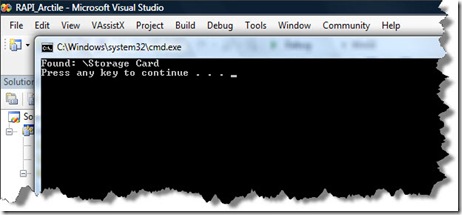
screenshot1

Here is the screenshot from the phone itself:


Disclaimer

I’ve implemented the solution and have tested it on few Windows Mobile and CE devices.  I was writing this article and launched Google to find more information about PInvoke (it was a mistake, I needed CeRapiInvoke). It always happens this way – I found an example in VB that uses exactly the same method of the temporary folder detection on CodeProject:
Display device memory information using P/Invoke
Nothing is new. Soon Google will have “Generate Code” feature proving us with already implemented solutions for our development questions.

Tuesday, November 10, 2009

Window with a predefined client rectangle

The task was to make a window with an image in the background and do not stretch the image.

The first application version I made just loaded the image into the memory, detected its size and created a popup window (WS_POPUP style) exactly of this size.

The QA said that it will be good, if the window will be moveable and sizeable. Ok. I added a caption and a frame. Now the image in the background is streched.

The first solution I found in Google - detect Window rectangle, then the client rectangle and the difference should be taken into a account when I set a rectangle for MoveWindow function:
HDC hDC = ::GetDC(NULL);
const int w = GetDeviceCaps(hDC, HORZRES);
const int h = GetDeviceCaps(hDC, VERTRES);
::ReleaseDC(NULL, hDC);

RECT rcClient, rcWindow;
GetClientRect(&rcClient);
GetWindowRect(&rcWindow);
m_Diff.x = (rcWindow.right - rcWindow.left) - rcClient.right;
m_Diff.y = (rcWindow.bottom - rcWindow.top) - rcClient.bottom;
cx += m_Diff.x;
cy += m_Diff.y;

RECT rect;
rect.left = (w >> 1) - (cx >> 1);
rect.top = (h >> 1) - (cy >> 1);
rect.right = rect.left + cx;
rect.bottom = rect.top + cy;

MoveWindow(&rect);
Two variables cx and cy are the predefined size of the background image.

This code works. But something's wrong here. Let's use Google again. :)

Of course, there is a Win32 API function that does the job: AdjustWindowRectEx.

And here is the code:
BOOL Center(int cx, int cy, RECT& rect)
{
HDC hDC = ::GetDC(NULL);
const int w = GetDeviceCaps(hDC, HORZRES);
const int h = GetDeviceCaps(hDC, VERTRES);
::ReleaseDC(NULL, hDC);

rect.left = (w >> 1) - (cx >> 1);
rect.top = (h >> 1) - (cy >> 1);
rect.right = rect.left + cx;
rect.bottom = rect.top + cy;

AdjustWindowRectEx(&rect, s_nWndStyle, FALSE, s_nWndStyleEx);
return TRUE;
}
This function above calculates the window rectangle for the predefined client area in the center of the desktop.
The function exists even for Windows Mobile and Windows CE: AdjustWindowRectEx. This MSDN article contains an example.

Now if you need to control the size of your window (do not allow to be smaller or bigger than the predefined size), you need to handle WM_GETMINMAXINFO message. For example, in the ATL-based application it will look as the following:
LRESULT OnGetMinMaxInfo(UINT nMsg, WPARAM wParam, LPARAM lParam, BOOL& bHandled)
{
LPMINMAXINFO pInfo = (LPMINMAXINFO)lParam;
if (pInfo != NULL)
{
pInfo->ptMinTrackSize = CPainter::GetMinSize();
}
return 0;
}
ptMinTrackSize in the MINMAXINFO structure is just a point, for example, set it as { 200, 200 } and the window cannot be smaller then 200x200.

More information about this WM_GETMINMAXINFO you can find on The Old New Thing.

Monday, November 9, 2009

The Beginning

If you are the Window programmer, you know that everything begins from here:
#define WIN32_LEAN_AND_MEAN        // Exclude rarely-used stuff from Windows headers

#include <windows.h>

LPCWSTR s_szWndClassName = L"Small Window";

ATOM RegisterWndClass(HINSTANCE hInstance, LPCWSTR lpszWndClassName);
LRESULT CALLBACK WndProc(HWND, UINT, WPARAM, LPARAM);

int APIENTRY wWinMain(HINSTANCE hInstance, HINSTANCE,
LPWSTR, int nCmdShow)
{
HWND hWnd = NULL;
MSG msg = { 0 };

RegisterWndClass(hInstance, s_szWndClassName);

hWnd = CreateWindow(s_szWndClassName, s_szWndClassName,
WS_OVERLAPPEDWINDOW,
CW_USEDEFAULT, 0, CW_USEDEFAULT, 0,
NULL, NULL, hInstance, NULL);

if (hWnd != NULL)
{
ShowWindow(hWnd, nCmdShow);
UpdateWindow(hWnd);

// Main message loop:
while (GetMessage(&msg, NULL, 0, 0))
{
TranslateMessage(&msg);
DispatchMessage(&msg);
}
}

return (int)msg.wParam;
}


ATOM RegisterWndClass(HINSTANCE hInstance, LPCWSTR lpszWndClassName)
{
WNDCLASSEX wcex = { 0 };
wcex.cbSize = sizeof(WNDCLASSEX);
wcex.style = CS_HREDRAW | CS_VREDRAW;
wcex.lpfnWndProc = WndProc;
wcex.hInstance = hInstance;
wcex.hCursor = LoadCursor(NULL, IDC_ARROW);
wcex.hbrBackground = (HBRUSH)(COLOR_WINDOW + 1);
wcex.lpszMenuName = NULL;
wcex.lpszClassName = lpszWndClassName;
return RegisterClassEx(&wcex);
}

LRESULT CALLBACK WndProc(HWND hWnd, UINT message, WPARAM wParam, LPARAM lParam)
{
PAINTSTRUCT ps;
HDC hdc;

switch (message)
{
case WM_PAINT:
hdc = BeginPaint(hWnd, &ps);
EndPaint(hWnd, &ps);
break;

case WM_DESTROY:
PostQuitMessage(0);
break;

    default:
return DefWindowProc(hWnd, message, wParam, lParam);
}
return 0;
}

Sunday, November 8, 2009

ATL, GDI+. PNG,...

After a half of a day of a dramatic struggle with CImage, I failed to make it working with the png images - the images that contain the alpha chanel. I found the solution, but with GDI+ and I will show it later.

Firstly, I have to say, that the CImage converts any image into 32 bit per pixel format, but it is just RGB (pre-muliplay alpha?). When CImage loads an image it copies the image data into an internal buffer. You can see everything yourself, if you will debug CImage methods such as Load from the stream, for example.

Secondly, I just included atlimage.h file header into my source code and got a bunch of dlls from which my application depends now. Including the dynamic run-time libraries, and GDI+, and something from the Windows Installer, and...

I very like ATL, I just love the style, but, probably, I will try to avoid using CImage in my projects.
For a fast and dirty job that does not require to load any data with alpha..., maybe, it is possible. CImage even has AlphaBlend function - it's just a wrapper for the Win API function. From my point view, it is just one more evidence of a bad design made for this class - from one side the class uses GDI+, from other side it uses GDI function to draw the image.

The original task was to load the PNG-file from the resources in an ATL-based application. I thought I solved it. It looked great - I made a template - CImageResource, that contain only one function -  LoadFromResource. The objects I created in my application were like

CImageResource<CImage> m_Image;

I added a window background image to the resources and saw it's drawn in the application window. AlphaBlend method was used and everything was just fine.

The problems begun when I added a button image with the real visible alpha.

So finally the class CImageResource is not a template :). It looks so:
#pragma once

class CImageResource
{
Bitmap* m_pBitmap;
HGLOBAL m_hBlock;

public:
CImageResource() : m_pBitmap(NULL), m_hBlock(NULL) {}
~CImageResource() { Clear(); }

inline BOOL IsNull() const { return m_pBitmap == NULL; }

UINT GetWidth()
{
if (IsNull())
return 0;
return m_pBitmap->GetWidth();
}

UINT GetHeight()
{
if (IsNull())
return 0;
return m_pBitmap->GetHeight();
}

BOOL Draw(HDC hDC, int x, int y)
{
if (IsNull())
return FALSE;
Graphics graphics(hDC);
return graphics.DrawImage(m_pBitmap, x, y,
m_pBitmap->GetWidth(), m_pBitmap->GetHeight()) == Ok;
}

BOOL Draw(HDC hDC, RECT& rect)
{
if (IsNull())
return FALSE;
Graphics graphics(hDC);
return graphics.DrawImage(m_pBitmap, rect.left, rect.top,
rect.right - rect.left, rect.bottom - rect.top) == Ok;
}

BOOL Load(LPCWSTR lpszFile)
{
Clear();
m_pBitmap = Bitmap::FromFile(lpszFile);
return m_pBitmap->GetLastStatus() == Ok;
}

BOOL LoadFromResource(UINT nResID)
{
Clear();
HMODULE hModule = GetModuleHandle(NULL);
HRSRC hResource = FindResource(hModule,
MAKEINTRESOURCE(nResID), L"IMAGES");
if (hResource == NULL)
return FALSE;

HGLOBAL hImage = LoadResource(hModule, hResource);
if (hImage == NULL)
return FALSE;
LPVOID pImage = LockResource(hImage);
if (pImage == NULL)
return FALSE;

HRESULT hr = E_FAIL;
int size = SizeofResource(hModule, hResource);
m_hBlock = GlobalAlloc(GMEM_MOVEABLE, size);
if (m_hBlock == NULL)
return FALSE;

LPVOID pBlock = GlobalLock(m_hBlock);
if (pBlock != NULL)
{
memmove(pBlock, pImage, size);
IStream* pStream = NULL;
if (CreateStreamOnHGlobal(m_hBlock, FALSE, &pStream) == S_OK)
{
m_pBitmap = Bitmap::FromStream(pStream);
pStream->Release();
if (m_pBitmap != NULL)
{
if (m_pBitmap->GetLastStatus() == Ok)
return TRUE;
}
delete m_pBitmap;
m_pBitmap = NULL;
}
GlobalUnlock(m_hBlock);
}
GlobalFree(m_hBlock);
m_hBlock = NULL;
return FALSE;
}

void Clear()
{
delete m_pBitmap;
m_pBitmap = NULL;
if (m_hBlock != NULL)
{
GlobalUnlock(m_hBlock);
GlobalFree(m_hBlock);
}
}
};

Now all images are loaded and drawn with the alpha. For drawing I use the GDI+ as well.
Here are few helpful links from CodeProject about this topic:
Joe Woodbury. Loading JPG & PNG resources using GDI+: http://www.codeproject.com/KB/GDI-plus/cgdiplusbitmap.aspx
Christian Graus. Starting with GDI+: http://www.codeproject.com/KB/GDI-plus/startinggdiplus.aspx
 Darren Sessions. A user draw button that supports PNG files with transparency, for Visual C++ 6.0 and VS2005: http://www.codeproject.com/KB/buttons/GdipButton.aspx